India e-Visa Payment Failed: Refund & Gateway Fix Guide
Last Updated on
25 July 2026
Experiencing an India e-Visa payment failed error can be incredibly stressful, especially when the screen freezes right at the finish line.I still remember the exact moment the screen fI still remember the exact moment the screen froze.
My Indian e-Visa application was complete. Passport uploaded. Hotel details added. Photograph resized perfectly after three attempts. Everything looked fine until I reached the payment page.
Two options appeared in front of me — SBIePay and Axis Bank.
I selected one, entered my card details, approved the OTP, and waited for the confirmation screen.
Instead, a message appeared:
“Transaction Failed. Please Try Again.”
I opened my banking app immediately.
The money had already been deducted.
If this has happened to you, take a breath. Your money is almost certainly coming back.
This problem is far more common than most travellers realise, especially with international cards. Every year, millions of people apply for an Indian e-Tourist Visa, e-Business Visa, or e-Medical Visa through the official government portal, and one issue keeps appearing again and again:
The payment fails on the website, but the bank still shows the charge.
The good news is that this is usually temporary and fixable.
If your Indian e-Visa payment failed but money was deducted, the amount is usually refunded automatically within 24–72 hours. This normally happens when the bank approves the transaction but the payment gateway fails to confirm it properly to the visa portal. Avoid retrying immediately and try the alternate gateway later if needed.
The key is understanding what is actually happening behind the scenes — and knowing when to wait, when to retry, and which payment gateway works best for your card.
Indian e-Visa Guide: Your Ultimate Success Toolkit for 2026
Step 1: Beat the Refusal – [Common Rejection Reasons & Expert Solutions]
Step 2: Technical Mastery – [Official Document Size & Formatting Standards 2026]
Step 3: Track Your Progress – [How to Resolve Application Status Delays]
Step 4: Choose the Right Visa –[ India e-Tourist vs e-Business Visa: Key Differences 2026 ]
Step 5: Check Your Entry Point [Updated ]– India e-Visa Entry Points List 2026: Where Can You Enter?
Note: These guides are updated weekly based on the latest Ministry of Home Affairs (MHA) protocols.

- India e-Visa Payment Failed: Refund & Gateway Fix Guide
- Quick Summary: India e-Visa Payment Failed Solution
- How the Indian e-Visa Payment System Actually Works
- SBIePay vs Axis Bank India visa
- Top Reasons for India e-Visa Payment Failed Error
- Indian e-Visa Payment Failed but Money Deducted : What It Means
- Indian e-Visa Payment Pending vs Settled Charge
- Why International Cards Get Declined
- SBIePay vs Axis Bank — Which Gateway Works Better?
- Best Indian e-Visa Payment Gateway by Country
- Real Patterns Travellers Keep Reporting
- The “24-Hour Rule” Most Forums Explain Poorly
- Why the Waiting Period Exists
- What the Timeline Usually Looks Like
- One Mistake You Should Avoid Completely
- Step-by-Step: Exactly What You Should Do Right Now
- Smart Checklist Before Paying Again
- Official Resources
- Conclusion: Resolving Your India e-Visa Payment Failed Issues
- FAQs about India e-Visa Payment Failed?
Quick Summary: India e-Visa Payment Failed Solution
If your Indian e-Visa payment failed but money was deducted:
- Do not retry immediately ( Repeated failed payment attempts can sometimes create application inconsistencies that later contribute to India e-Visa processing complications and rejection risks India e-Visa rejection reasons
- Wait at least 24 hours
- Check whether the charge is “pending” or “settled”
- Retry later using the other payment gateway
- If the money has not returned after 72 hours, contact your bank and e-Visa support
In most cases, the amount is automatically reversed within 24–72 hours.
How the Indian e-Visa Payment System Actually Works
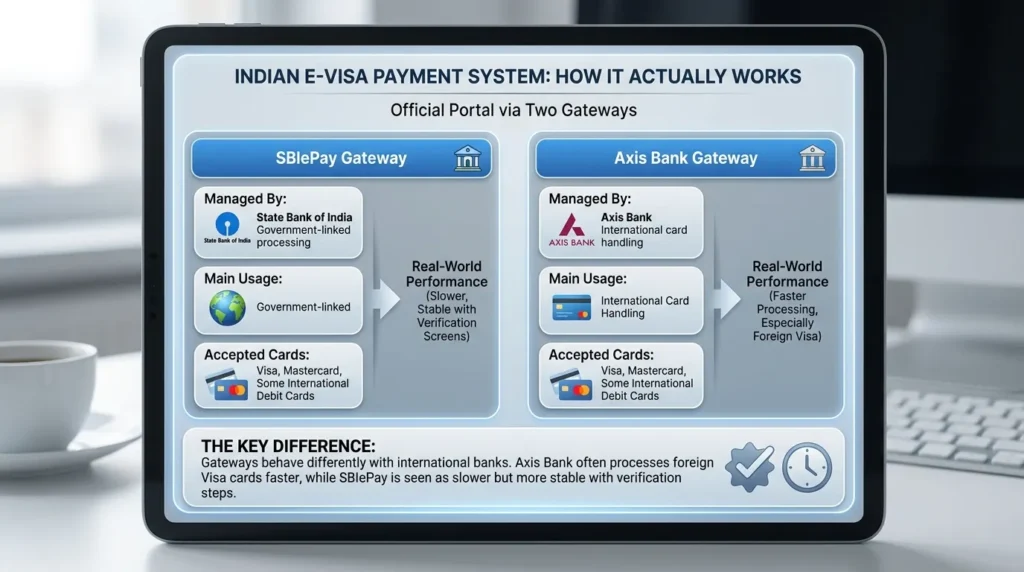
The official Indian e-Visa portal processes payments through two gateways:
SBIePay vs Axis Bank India visa
| Gateway | Managed By | Main Usage |
|---|---|---|
| SBIePay | State Bank of India | Government-linked processing |
| Axis Bank Gateway | Axis Bank | International card handling |
Both gateways accept:
- Visa
- Mastercard
- Some international debit cards
But here is what most people do not realise:
The two gateways behave very differently with international banks.
During my own application process, SBIePay felt slower but more stable with verification screens. Axis Bank processed faster, especially with foreign Visa cards.
That difference matters far more than most travel blogs explain.
Top Reasons for India e-Visa Payment Failed Error
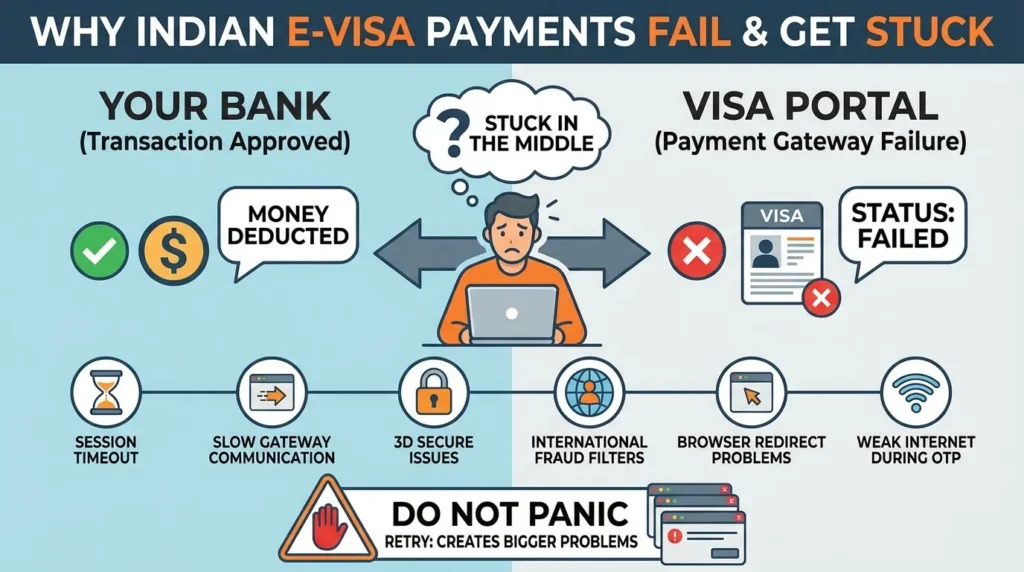
If your payment failed but money was deducted, it usually means:
Your bank approved the transaction, but the payment gateway failed to confirm it properly to the visa portal.
So the bank sees success.
The visa portal sees failure.
And you are stuck in the middle.
This normally happens because of:
- Session timeout
- Slow communication between gateway and visa server
- 3D Secure verification issues
- International fraud filters
- Browser redirect problems
- Weak internet connection during OTP verification
Many travellers panic at this stage and retry repeatedly.
That often creates even bigger problems.
Indian e-Visa Payment Failed but Money Deducted : What It Means
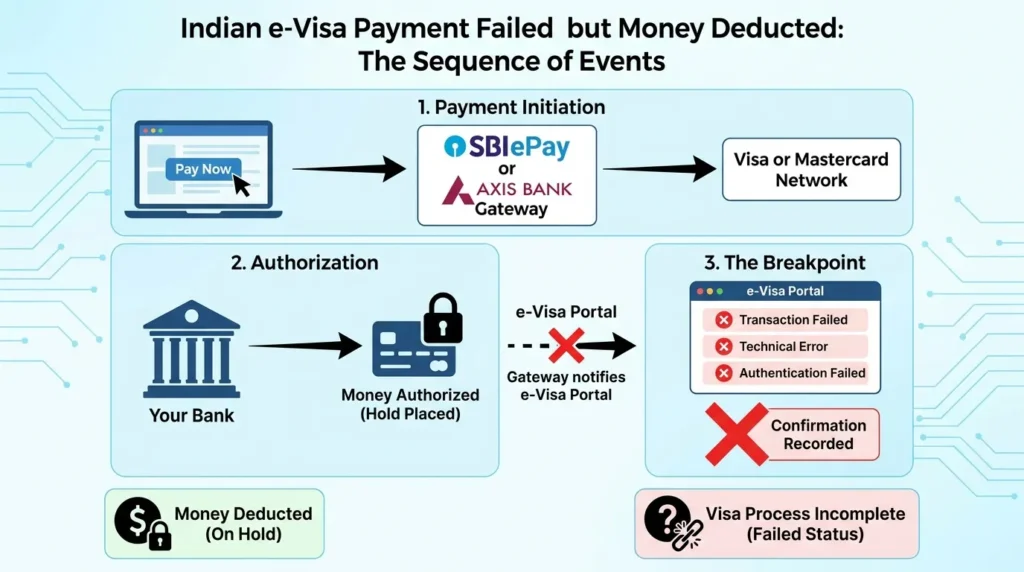
Let’s slow this down because understanding the sequence removes most of the fear.
When you click “Pay Now”, several systems start communicating at once:
- Your browser connects to SBIePay or Axis Bank
- The gateway contacts Visa or Mastercard
- Your bank approves the payment
- The money gets authorised
- The gateway tries to notify the e-Visa portal
- The visa portal fails to record the confirmation in time
That final step is where things break.
The portal then shows:
- “Transaction Failed”
- “Technical Error”
- “Authentication Failed”
Meanwhile, your bank has already placed the hold on your card.
So the money looks deducted even though the visa system never completed the process.
Indian e-Visa Payment Pending vs Settled Charge
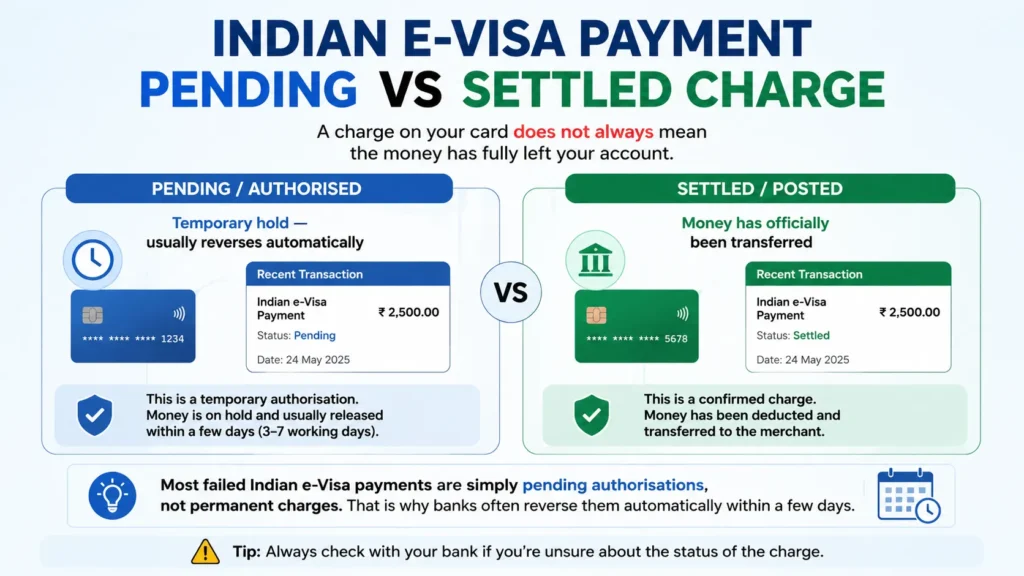
This is the part many travellers misunderstand.
A charge on your card does not always mean the money has fully left your account.
There are two possibilities:
| Status | Meaning |
|---|---|
| Pending / Authorised | Temporary hold — usually reverses automatically |
| Settled / Posted | Money has officially been transferred |
Most failed Indian e-Visa payments are simply pending authorisations, not permanent charges.
That is why banks often reverse them automatically within a few days.
Why International Cards Get Declined
After helping several travellers troubleshoot this issue, I noticed the same patterns appearing repeatedly.
1. 3D Secure Authentication Fails
The Indian e-Visa portal requires 3D Secure verification.
That means:
- OTP approval
- Verified by Visa
- Mastercard SecureCode
If the OTP arrives late, the page freezes, or the redirect fails, the payment usually gets rejected.
2. International Fraud Protection Blocks the Payment
Many banks treat Indian government transactions as “unusual international activity”.
This happens especially with:
- UK challenger banks
- American credit unions
- Some digital banking apps
A quick call to your bank often fixes this instantly.
3. Address Verification Mismatch
Some US banks compare your billing address exactly.
Even a slightly different postcode format can trigger rejection.
4. American Express Performs Poorly
AmEx consistently reports higher failure rates on both SBIePay and Axis Bank.
This is not your fault.
It is mainly a compatibility issue between AmEx processing systems and the gateway configuration.
If possible, use:
- Visa
- Mastercard
instead.
SBIePay vs Axis Bank — Which Gateway Works Better?
Most websites simply say:
“Try the other gateway.That advice is incomplete.
The smarter approach is choosing the gateway that usually works best for cards from your country.
Best Indian e-Visa Payment Gateway by Country
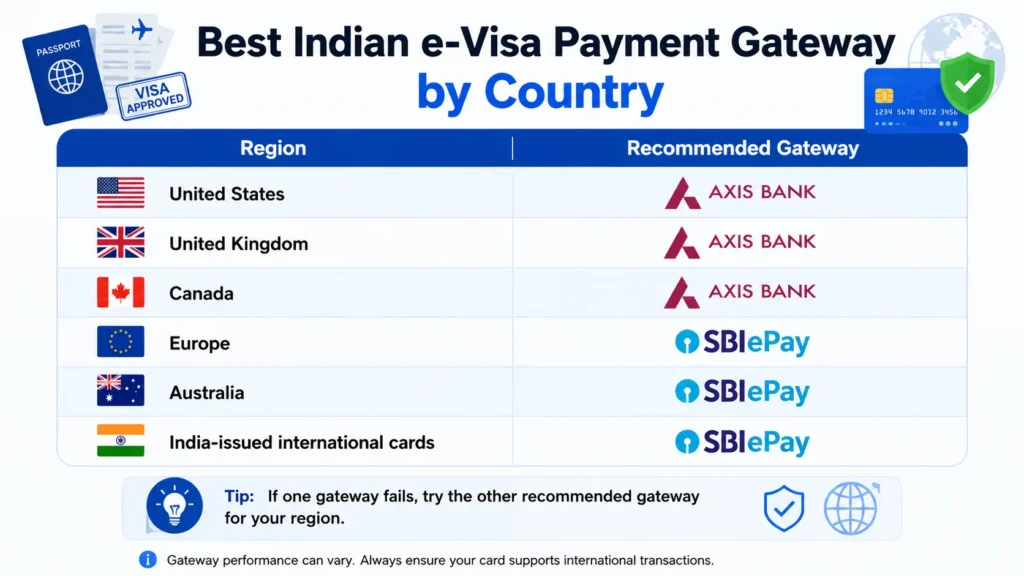
| Region | Recommended Gateway |
|---|---|
| 🇺🇸 United States | Axis Bank |
| 🇬🇧 United Kingdom | Axis Bank |
| 🇨🇦 Canada | Axis Bank |
| 🇪🇺 Europe | SBIePay |
| 🇦🇺 Australia | SBIePay |
| 🇮🇳 India-issued international cards | SBIePay |
Real Patterns Travellers Keep Reporting
A traveller from Manchester once told me his Mastercard failed twice on SBIePay but worked instantly on Axis Bank five minutes later.
Another traveller from Germany had the exact opposite experience — SBIePay processed successfully on the first attempt while Axis failed repeatedly.
Over time, certain patterns became obvious:
- US and Canadian Visa cards usually work better on Axis Bank
- European cards often perform better on SBIePay
- AmEx struggles on both gateways
These are not official rules, but repeated user experiences show remarkably similar trends.
The “24-Hour Rule” Most Forums Explain Poorly
Almost every India e-Visa discussion eventually includes somebody saying:
“Just wait 24 hours.”
That advice is correct — but incomplete.
Why the Waiting Period Exists
Visa and Mastercard process failed reversals in batches.
So when:
- your bank approves the payment
- but the merchant system marks it failed
the reversal has to travel back through the same network.
That takes time.
What the Timeline Usually Looks Like
| Timeline | What Normally Happens |
|---|---|
| 0–24 hours | Pending hold often disappears automatically |
| 24–72 hours | International reversals complete |
| 3–7 business days | Slower banks process refunds |
| 72+ hours with settled charge | Escalation may be needed |
One Mistake You Should Avoid Completely
Do not make repeated payment attempts quickly.
This can trigger:
- Fraud protection systems
- Session locks
- Temporary application restrictions
I made this mistake myself once.
After several rapid retries, the portal temporarily blocked further payment attempts altogether.
Patience works better than panic here.Before retrying payment, also verify that your uploaded passport scan and photo still match the latest . official India e-Visa document size standards
Step-by-Step: Exactly What You Should Do Right Now
Step 1 :Do Not Retry Immediately
Close the browser.
Wait at least 30–60 minutes before doing anything else.
Step 2 : Check Your Banking App Carefully
Look for words like:
- Pending
- Authorised
- Processing
If you see those terms, the amount often reverses automatically.
Step 3 : Save Evidence
Take screenshots of:
- The payment deduction
- The error message
- Your application reference number
You may need them later.
Step 4 : Log Back Into the Visa Portal
Sometimes the payment actually goes through later even after the error screen appears.
check Indian e-Visa application status
Check whether the application now shows:
- “Under Process”
- “Submitted Successfully”
If yes, your payment may already be recorded.
Step 5 : Retry Using the Other Gateway
If SBIePay failed:
- try Axis Bank later
If Axis failed:
- try SBIePay instead
Before retrying:
- ensure 3D Secure is active
- use Chrome or Firefox
- avoid VPNs
- use stable internet
Step 6 :Contact Your Bank After 72 Hours
Ask one simple question:
“Is this transaction pending authorisation or fully settled?”
That question gives clarity quickly.
Step 7 :Contact Indian e-Visa Support
if:
- 72 hours have passed
- the amount is settled
- no refund has arrived
then contact support with:
| Required Item | Why Needed |
|---|---|
| Application ID | Identifies visa file |
| Transaction Number | Tracks payment |
| Bank screenshot | Proof of charge |
| Date & Time | Helps locate transaction |
Typical response time is around 7–15 days.
Common Error Messages Explained Simply
| Error Message | What It Usually Means | Best Fix |
|---|---|---|
| Transaction Failed | Gateway could not confirm payment to visa server | Wait and retry later |
| Authentication Failed | OTP / 3DS issue | Use desktop browser |
| Card Declined by Issuer | Bank blocked transaction | Call bank |
| Payment Gateway Error | SBI or Axis overloaded | Try other gateway |
| Session Expired | Payment process took too long | Start fresh session |
| Duplicate Transaction | System detected repeated attempts | Wait 24 hours |
Smart Checklist Before Paying Again
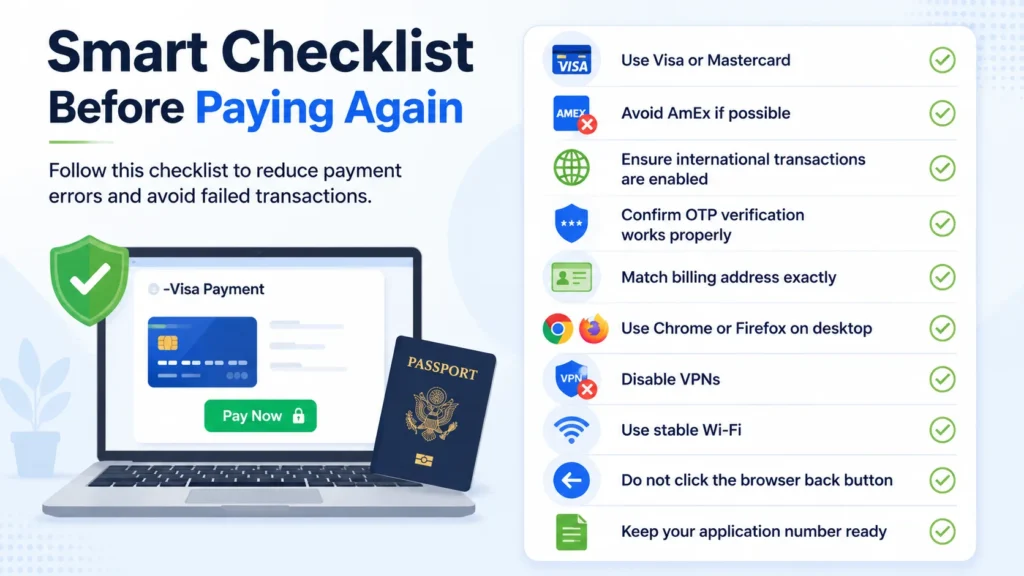
Before your next attempt:
- Use Visa or Mastercard
- Avoid AmEx if possible
- Ensure international transactions are enabled
- Confirm OTP verification works properly
- Match billing address exactly
- Use Chrome or Firefox on desktop
- Disable VPNs
- Use stable Wi-Fi
- Do not click the browser back button
- Keep your application number ready
These small steps prevent most failures.
Official Resources
For safety, always use the official Government of India e-Visa website and avoid third-party visa portals.
India helpline: +91-11-24300666
Indian e-Visa Status Enquiry Page
Indian e-Visa Instructions PDF
e-Visa support email: indiaevisa@gov.in
Conclusion: Resolving Your India e-Visa Payment Failed Issues
Experiencing an India e-Visa payment failed error can be incredibly stressful, especially when money is deducted instantly from your account. However, you are not alone. Most Indian e-Visa payment gateway error instances occur simply because your international bank approves the transaction slightly before the official visa portal can successfully record the confirmation.
If you are currently facing an India e-Visa payment failed but money deducted situation, do not panic. Follow these essential steps to secure your visa and your money:
- Wait Patiently: Most deducted amounts from an India e-Visa payment failed transaction are automatically refunded within 24–72 hours without any manual intervention.
- Avoid Rapid Retries: Do not make repeated payment attempts immediately after encountering an Indian e-Visa payment gateway error, as this can trigger fraud protection or session blocks on your application.
- Check Transaction Status: Verify if the charge is “Pending” or “Settled” in your banking app before attempting to pay the fee again.
- Switch Gateways: If one gateway fails, wait for the 24-hour cooling period. When deciding between SBIePay vs Axis Bank India visa processing, retry using the alternate option that works best for your country’s cards.
Most travelers who encounter an India e-Visa payment failed notification eventually receive both their full refund and their approved visa successfully by simply following this “24-hour rule”. Remember, a temporary India e-Visa payment failed screen does not mean your travel plans are ruined—it just requires a little patience and selecting the correct payment gateway.
If your payment eventually succeeds but the application remains stuck for several days, these India e-Visa status delay solutions may help.India e-Visa application status delays
FAQs about India e-Visa Payment Failed?
Why did my Indian e-Visa payment fail but money get deducted?
Your Indian e-Visa payment may fail even after money is deducted because the bank approves the transaction before the visa portal confirms it successfully. In most cases, the amount is automatically reversed within 24–72 hours.
How long does an Indian e-Visa payment refund take?
Most Indian e-Visa payment refunds are processed within 24–72 hours. However, some international banks may take 3–7 business days to remove the pending authorisation or complete the refund.
Which gateway is better for Indian e-Visa payments — SBIePay or Axis Bank?
Axis Bank usually works better for US, UK, and Canadian cards, while SBIePay often performs more reliably with European cards and India-issued international cards.
Can I retry my Indian e-Visa payment immediately after failure?
No. It is better to wait at least 24 hours before retrying an Indian e-Visa payment. Multiple rapid attempts can trigger temporary fraud protection or session blocks on the application.
What does “payment pending” mean on the Indian e-Visa portal?
A pending Indian e-Visa payment usually means the bank authorised the amount, but the visa portal has not fully confirmed the transaction yet. Many pending payments are automatically updated or reversed within a few days.
Why do international cards fail on the Indian e-Visa website?
International cards often fail because of 3D Secure verification issues, fraud protection systems, OTP delays, billing address mismatches, or communication delays between the payment gateway and foreign banks.
Should I create a new Indian e-Visa application after payment failure?
No. In most cases, you can continue using the same Indian e-Visa application reference number and simply retry the payment later using the alternate gateway.
What should I do if my Indian e-Visa payment is settled but no refund arrives?
If your Indian e-Visa payment is fully settled and no refund appears after 72 hours, contact your bank first and then email the official e-Visa support team with your application ID, transaction details, and payment proof.